

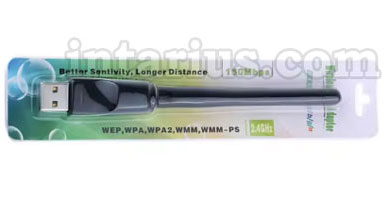
USB Wi-Fi adapters allow devices such as DVB-T2 set-top boxes, satellite receivers, computers, and other compatible equipment to connect to a Wi-Fi network without using a wired Ethernet connection.
Let’s take a closer look at the different types of USB Wi-Fi adapters available for DVB-T2 and satellite receivers, as well as the features that set them apart.
USB Wi-Fi adapters differ in several key characteristics:
- Chipset
- Operating frequency
- Antenna gain
- Wi-Fi standard
- Physical size and design
The two most common chipsets used in USB Wi-Fi adapters for DVB-T2 and satellite receivers are RT5370 and MT7601. These chipsets are widely supported by many receiver manufacturers.
Download drivers for USB Wi-Fi adapters:
Drivers for USB Wi-Fi adapters with MT7601 and RT5370 chipsets.
If you plan to use a USB Wi-Fi adapter with a Windows computer, you may need to install the appropriate driver. Windows 10 and newer versions often install compatible drivers automatically. However, DVB-T2 and satellite receivers cannot install additional drivers manually because the required drivers are built directly into the receiver’s firmware.
If your receiver does not recognize a particular USB Wi-Fi adapter, the only solution is to install newer firmware that includes support for that chipset. Before updating the firmware, make sure you understand the process, as installing incorrect firmware may damage your receiver.
If you decide to update your receiver’s firmware, it is recommended that you first read this guide.
The practical differences between the RT5370 and MT7601 chipsets are relatively small. The RT5370 is usually slightly more expensive, although many users consider it to be a reliable choice.
Modern USB Wi-Fi adapters typically support either the 2.4 GHz band, the 5 GHz band, or both. The 2.4 GHz band offers greater coverage and better signal penetration through walls, while the 5 GHz band provides higher data transfer speeds over shorter distances.
Several Wi-Fi standards are available. Older standards such as 802.11a, 802.11b, and 802.11g are now rarely used due to their limited performance. The most common standards today are 802.11n and 802.11ac. The 802.11n standard supports speeds of up to 150 Mbps, while 802.11ac can deliver speeds of up to 433 Mbps under suitable conditions.
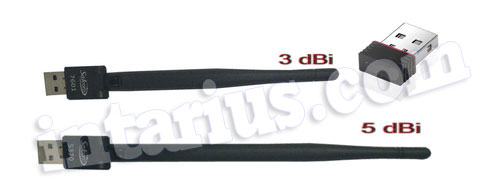
USB Wi-Fi adapters are available in different sizes, ranging from compact models that resemble a USB flash drive to larger models equipped with external antennas.
The three most common types of USB Wi-Fi adapters are:
- Compact adapters without an external antenna.
- Adapters with a 2 dBi antenna.
- Adapters with a 5 dBi antenna.
Generally, a larger antenna provides better reception and a longer wireless range.
When choosing a USB Wi-Fi adapter, consider your receiver’s compatibility, the supported chipset, Wi-Fi standard, operating frequency, and the signal range you require.
For more information about selecting the right adapter for your receiver, read this guide.
You can purchase USB Wi-Fi adapters using the links below:
- USB Wi-Fi adapter MT7601.
- USB Wi-Fi adapter RT5370 (this model has been discontinued).