


You purchased an IPTV set-top box—such as an Android TV box or Smart TV Box—to enjoy movies, TV series, and live television in high quality. Instead, you’re experiencing buffering, freezing, or long loading times. These issues are quite common and can make watching IPTV frustrating.
What Affects IPTV Streaming Quality?
One of the most important factors is your Internet connection. If your Internet speed is too low or unstable, IPTV channels may buffer, freeze, or fail to load altogether.
However, Internet speed isn’t the only factor. The hardware specifications of your Android TV box or Smart TV device also play a significant role. If the processor or available RAM isn’t powerful enough, the device may struggle to decode high-resolution video streams such as Full HD and 4K Ultra HD. In this case, upgrading to a more powerful streaming device may be necessary.
Recommended Internet Speed for IPTV
Different types of content require different Internet speeds. The figures below are general recommendations for smooth playback.
- YouTube streaming: approximately 4 Mbps is usually sufficient, thanks to Google’s highly optimized content delivery network.
- IPTV services (such as Bizon TV, Faino TV, or Peers TV): a stable connection of at least 5 Mbps is recommended.
- Full HD (1080p) IPTV: at least 15 Mbps for reliable playback.
- 4K Ultra HD at 60 fps: approximately 100 Mbps or faster for uninterrupted streaming.
In general, an Internet connection of 15 Mbps or higher is sufficient for most Full HD IPTV channels, while 100 Mbps or more is recommended for high-bitrate 4K content.
Recommended Internet Speed by Video Resolution
The table below shows the recommended Internet speed for different IPTV video resolutions.
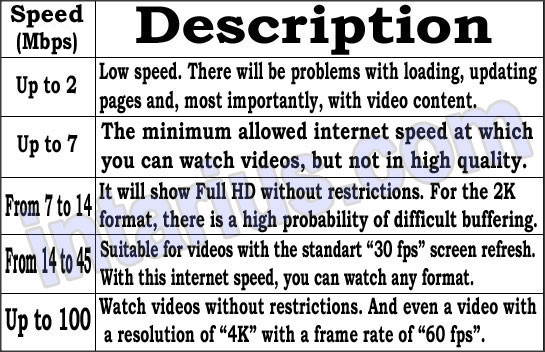
If your Internet connection meets these recommendations, IPTV playback should be smooth and free from excessive buffering or long loading times.
Keep in mind that buffering isn’t always caused by Internet speed alone. Router settings, Wi-Fi signal quality, IPTV playlists, or hardware limitations can also affect playback performance. If your IPTV still freezes despite having a fast Internet connection, read this troubleshooting guide for additional solutions.