

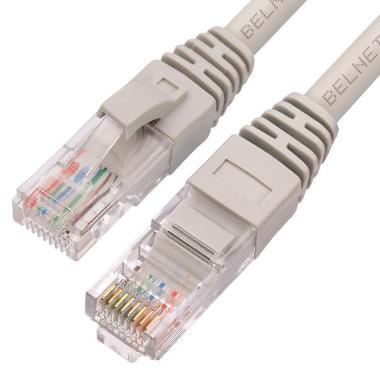
 An Ethernet cable, commonly known as a twisted pair cable, is the most widely used type of network cable for connecting computers, routers, switches, and other Ethernet-enabled devices.
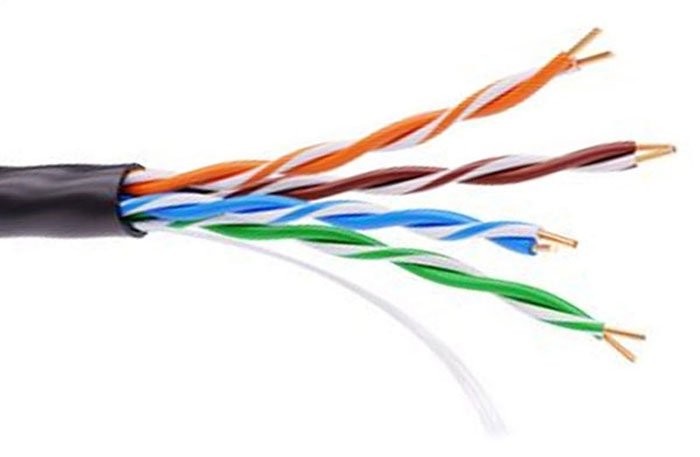
A standard Ethernet cable contains eight conductors arranged into four twisted pairs. Each conductor is individually insulated and color-coded, while all four pairs are enclosed within a durable outer jacket.
Twisting the wire pairs helps minimize electromagnetic interference (EMI) and crosstalk, ensuring reliable high-speed data transmission. Depending on the cable type, additional shielding may also be included to provide extra protection in electrically noisy environments.
Ethernet Cable Categories.
The table below shows the maximum operating frequency and data transmission speed supported by the most common Ethernet cable categories currently available.
Only cable categories that are still commercially available are included. Older standards such as Category 1 (Cat1), Category 2 (Cat2), and Category 4 (Cat4) have been discontinued and are no longer used in modern Ethernet networks.
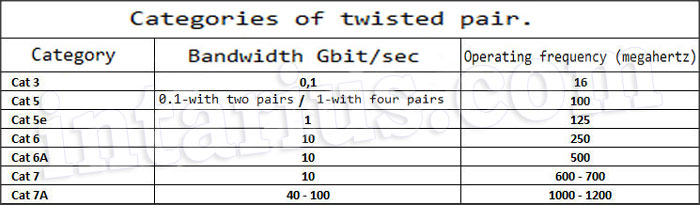
As shown in the table, Category 7A (Cat7A) offers the highest performance among widely available copper Ethernet cables, but it is also one of the most expensive options. Maximum data rates of 100 Gbps are only achievable over cable lengths of up to 50 meters (164 feet).
Category 3 (Cat3) cables were originally designed for telephone systems and legacy networking equipment. They are unsuitable for modern Ethernet installations.
Today, Category 5e (Cat5e) and Category 6 (Cat6) remain the most popular choices for home and office networks due to their excellent balance of performance, compatibility, and cost.
Shielded Ethernet Cables.
Shielded Ethernet cables are designed to reduce electromagnetic interference (EMI) and radio frequency interference (RFI). They are recommended whenever network cables are installed near:
- power cables;
- transformers;
- electric motors;
- industrial machinery;
- fluorescent lighting;
- equipment that generates strong electromagnetic fields.
In these environments, shielding helps maintain signal quality and reduces transmission errors.
For most residential and standard office installations, however, an unshielded twisted pair (UTP) cable is more than adequate.
Ethernet cables are identified by standardized shielding designations defined by ISO/IEC 11801.
The most common cable types are:
- U/UTP (Unshielded/Unshielded Twisted Pair) – no overall shield and no shielding around individual pairs. This is the standard Ethernet cable used in most homes and offices.
- F/UTP (Foiled/Unshielded Twisted Pair) – a single foil shield surrounds all four twisted pairs.
- U/FTP (Unshielded/Foiled Twisted Pair) – each twisted pair is individually wrapped in foil, but there is no overall cable shield.
- S/FTP (Screened/Foiled Twisted Pair) – an overall braided shield surrounds the cable, while each twisted pair is individually protected with foil. This provides excellent protection against EMI and crosstalk.
- SF/UTP (Screened and Foiled/Unshielded Twisted Pair) – combines both an overall braided shield and an overall foil shield, but the individual twisted pairs are not separately shielded.
The table below summarizes the technical characteristics of each shielding type.
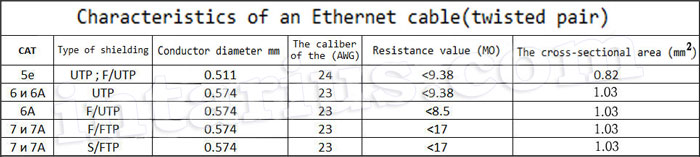
Additional Ethernet Cable Specifications.
Besides cable category and shielding, Ethernet cables also differ in the material used for their conductors.
The most common conductor materials are:
- Aluminum
- Steel
- Copper-Clad Aluminum (CCA)
- Pure Copper
Pure copper conductors provide the best electrical performance, lower resistance, improved flexibility, and greater durability. Copper cables also deliver more reliable signal transmission, especially over longer distances.
Copper-clad aluminum (CCA) cables are less expensive but have higher electrical resistance and are generally not recommended for professional network installations or Power over Ethernet (PoE) applications.
Each twisted pair consists of one solid-colored conductor and one white conductor with a matching colored stripe. Maintaining the correct pairing is essential because Ethernet transmits data over balanced wire pairs. Mixing conductors from different pairs can significantly reduce network performance.
RJ45 Connector Pin Functions.
An RJ45 (8P8C) connector contains eight numbered contacts.
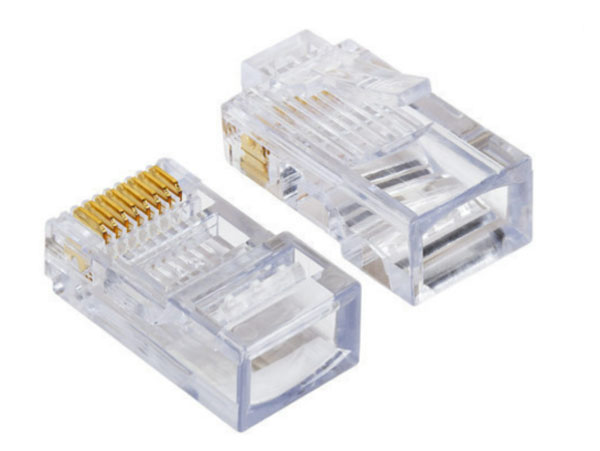
- Pins 1 and 2 (Transmit – Tx) transmit data on traditional 10BASE-T and 100BASE-TX Ethernet connections.
- Pins 3 and 6 (Receive – Rx) receive data on traditional 10BASE-T and 100BASE-TX connections.
- Pins 4, 5, 7, and 8 may be used for Power over Ethernet (PoE), depending on the PoE standard and the network equipment.
It is important to note that the conductors forming the second and third twisted pairs are intentionally arranged in a non-sequential order inside the RJ45 connector.
For Fast Ethernet (100BASE-TX), only two twisted pairs (pins 1–2 and 3–6) are used for data transmission.
For Gigabit Ethernet (1000BASE-T) and faster Ethernet standards, all four twisted pairs carry data simultaneously, significantly increasing network throughput.
Modern Ethernet devices also support Auto MDI-X, allowing them to automatically detect the cable wiring configuration. As a result, crossover cables are rarely required in modern networks.
Ethernet Cable Wiring Standards.
Straight-Through Cable.
A straight-through Ethernet cable is the most commonly used cable type in modern networks. Both ends of the cable are terminated using the same wiring standard, either T568A or T568B.
Straight-through cables are typically used to connect:
- a computer to a network switch;
- a computer to a router;
- a router to a switch;
- a network printer to a switch;
- most other Ethernet devices.
Thanks to Auto MDI-X, supported by virtually all modern networking equipment, either the T568A or T568B standard can be used as long as both ends of the cable are wired identically.
The T568B wiring standard is the most commonly used in North America and many other countries, while T568A is more frequently specified in government and commercial installations.
T568A Pinout.
In the T568A standard, both RJ45 connectors are terminated using the following wire sequence.
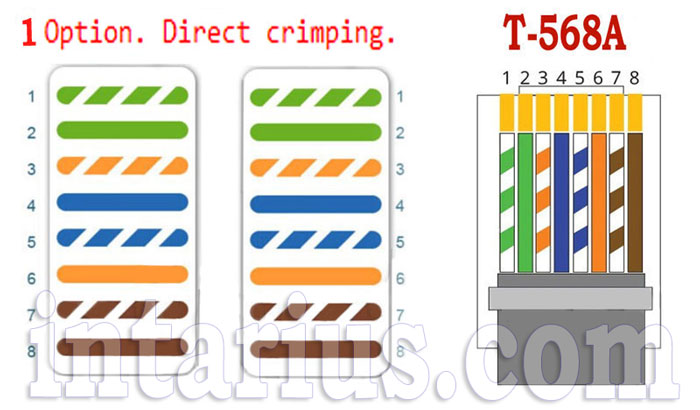
- White/Green
- Green
- White/Orange
- Blue
- White/Blue
- Orange
- White/Brown
- Brown
Both ends of the cable use the same pinout, creating a standard straight-through Ethernet cable.
T568B Pinout.
The T568B standard differs only in the positions of the green and orange wire pairs.
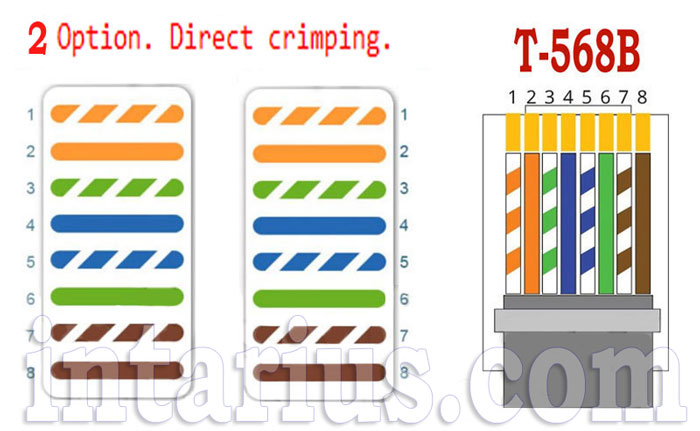
- White/Orange
- Orange
- White/Green
- Blue
- White/Blue
- Green
- White/Brown
- Brown
As with the T568A standard, both connectors are terminated identically, resulting in a straight-through cable.
Although the wire order differs slightly between T568A and T568B, network performance is identical. The only requirement is that both ends of the cable use the same standard.
Most installers prefer T568B, since it has become the de facto standard for Ethernet cabling in many regions.
Choosing Between T568A and T568B.
Both wiring standards are fully compliant with the ANSI/TIA-568 specification and support the same Ethernet speeds, including:
- 10 Mbps (10BASE-T)
- 100 Mbps (100BASE-TX)
- 1 Gbps (1000BASE-T)
- 2.5 Gbps
- 5 Gbps
- 10 Gbps (when using the appropriate cable category)
The difference between T568A and T568B is only the placement of the green and orange wire pairs. Signal quality, bandwidth, and network performance remain exactly the same.
For new installations, the most important rule is consistency. Mixing T568A and T568B on opposite ends of a cable creates a crossover cable rather than a standard straight-through cable.
Crossover Ethernet Cable.
A crossover Ethernet cable is wired differently from a straight-through cable. One end of the cable is terminated using the T568A standard, while the other end uses the T568B standard. This arrangement swaps the transmit (Tx) and receive (Rx) wire pairs, allowing two similar devices to communicate directly.
Historically, crossover cables were commonly used to connect:
- two computers directly;
- two laptops directly;
- two network switches;
- two hubs;
- two routers without an uplink port.
Today, however, crossover cables are rarely required. Most modern Ethernet devices support Auto MDI-X, a feature that automatically detects the cable type and configures the transmit and receive pairs accordingly. As a result, a standard straight-through cable is sufficient for nearly all Ethernet connections.
If you are working with older networking equipment that does not support Auto MDI-X, a crossover cable may still be necessary.
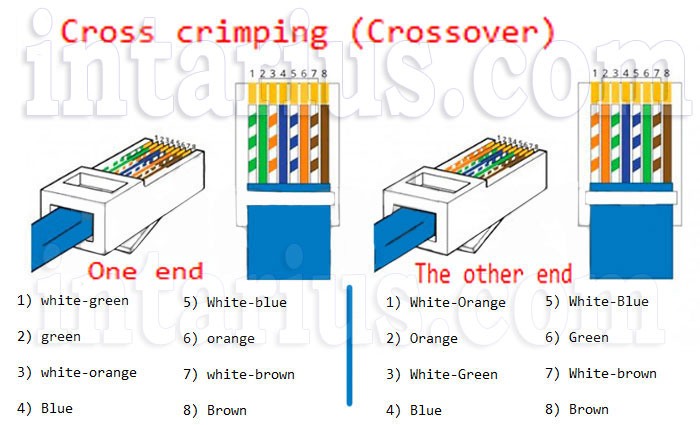
Crossover Cable Pinout.
| T568A End | T568B End |
|---|---|
| 1. White/Green | 1. White/Orange |
| 2. Green | 2. Orange |
| 3. White/Orange | 3. White/Green |
| 4. Blue | 4. Blue |
| 5. White/Blue | 5. White/Blue |
| 6. Orange | 6. Green |
| 7. White/Brown | 7. White/Brown |
| 8. Brown | 8. Brown |
Unlike a straight-through cable, the green and orange wire pairs are exchanged between the two connectors.
For 10BASE-T and 100BASE-TX Ethernet, the crossover swaps only the transmit and receive pairs. In Gigabit Ethernet (1000BASE-T) and faster standards, all four twisted pairs carry data simultaneously. Thanks to Auto MDI-X, dedicated crossover cables are generally unnecessary in modern networks.
Conclusion.
Choosing the right Ethernet cable category, shielding type, and wiring standard is essential for building a fast and reliable network. Understanding the differences between cable types and RJ45 wiring standards will help you select the appropriate cable and ensure stable network performance.
Other articles you may find interesting:
HDMI Cable – read here.
RCA Cable – read here.
RCA to 3.5 mm Jack Cable – read here.
Null Modem Cable – read here.
RS-232 to 3.5 mm Jack Cable – read here.